Introduction
Modern computers can connect to an impressive range of peripherals, but the number of physical ports available on a laptop or desktop is not always enough for the way people actually work. A typical workstation may include several external storage devices, a keyboard, mouse, webcam, printer, card reader, smartphone, and other accessories. Once multiple devices are connected, available USB ports can disappear quickly.
A powered USB hub provides one way to address this limitation. Rather than relying entirely on the computer’s USB port for power, a powered hub uses an external power adapter to operate the hub and provide power to compatible connected devices. This can make a significant difference when a setup contains more peripherals than a basic bus-powered hub is designed to handle.
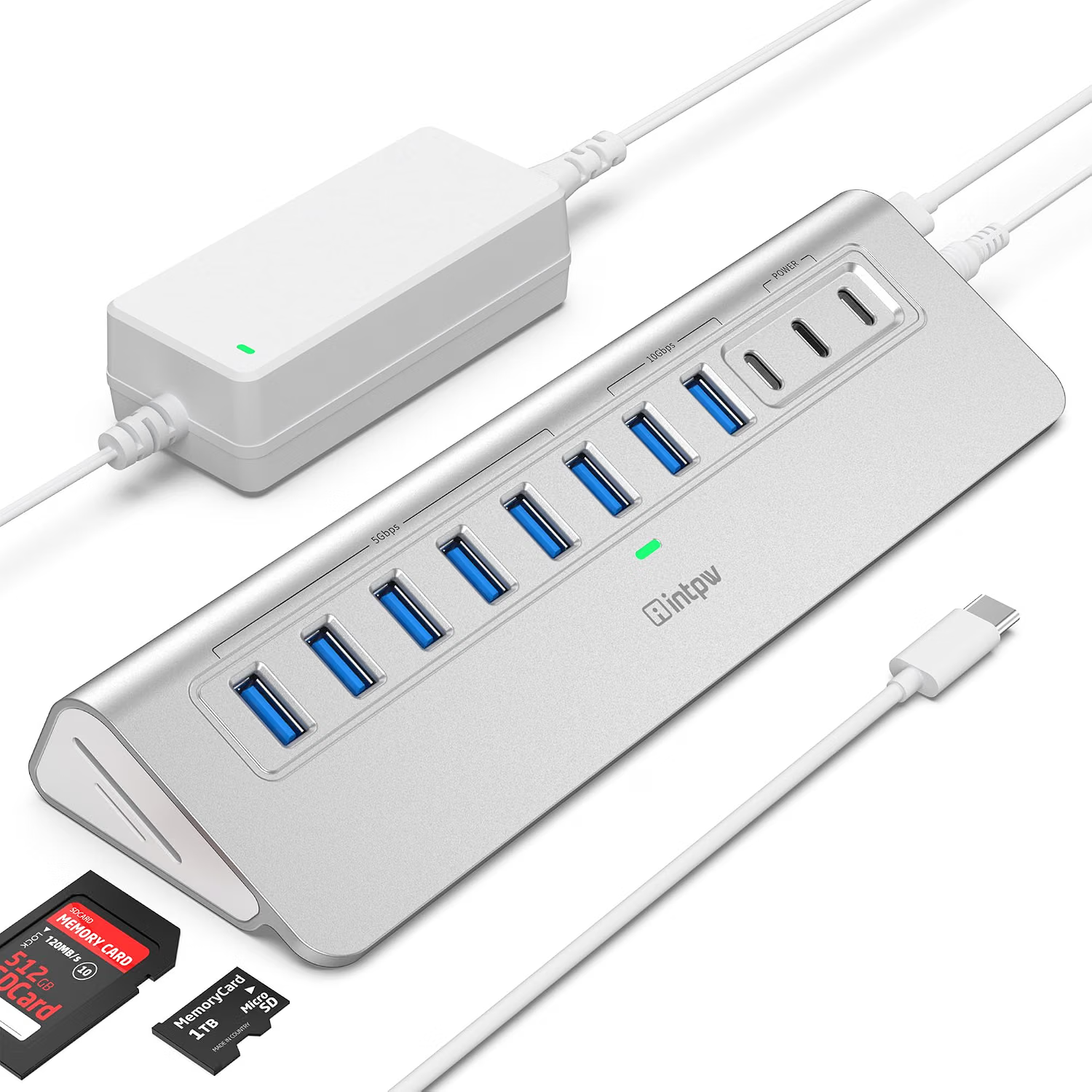
The intpw YH9AC Plus 13-Port USB 3.2 Hub is built around that concept. The product listing describes a combination of USB-A and USB-C connectivity, multiple USB-A ports, two USB-C Power Delivery charging ports, SD and TF card readers, and an external 65W power adapter. The product is also described as supporting USB 3.2 connectivity with transfer speeds of up to 10Gbps on applicable ports.
A large hub such as this is less about adding one convenient USB connection and more about creating a central peripheral station for a computer. It can be useful in a desktop workstation, home office, creative workspace, gaming setup, laboratory environment, or any situation where several USB devices need to remain connected.
At the same time, a 13-port hub should not be interpreted as thirteen completely independent high-speed USB connections. USB bandwidth is still governed by the host connection, while charging output depends on the hub’s power architecture and the connected device. The external 65W adapter provides power to the hub, but it does not mean that 65W is available to every port simultaneously.
Understanding these distinctions makes it easier to determine whether a high-port-count powered hub fits a particular setup.
This guide explores the intpw YH9AC Plus configuration, its connectivity options, practical uses, power considerations, USB bandwidth, memory-card functionality, smartphone connectivity, and the differences between a powered USB hub and other categories of USB accessories.
Key Features
13-Port USB Expansion
The defining characteristic of the YH9AC Plus is its large number of connections.
The product listing describes a 13-port arrangement that combines:
- USB-C and USB-A data connectivity
- Six USB-A 3.0 ports
- Two USB-C Power Delivery charging ports
- SD card reader
- TF/microSD card reader
- Additional high-speed USB connectivity
The exact layout and capabilities of individual ports should always be confirmed against the current Amazon listing and supplied documentation because ports with similar physical connectors can have different functions.
The large number of available connections makes this type of hub particularly relevant to permanent workstation setups.
A user could potentially leave a keyboard, mouse, external drives, printer, webcam, card reader, and other accessories connected simultaneously instead of repeatedly switching devices between a small number of computer ports.
USB 3.2 Connectivity
The product is marketed around USB 3.2 connectivity with transfer speeds of up to 10Gbps for applicable ports.
The 10Gbps figure represents a theoretical interface rate rather than a guaranteed real-world file-transfer speed.
Actual performance can depend on:
- The host computer
- The connected peripheral
- USB controller architecture
- Cable quality
- File sizes
- Storage-device performance
- Simultaneous USB activity
- Operating-system overhead
A high-speed external SSD may benefit substantially more from a 10Gbps interface than a keyboard or mouse.
For everyday input devices, the maximum USB bandwidth is rarely the limiting factor.
Multiple USB-A Ports
USB-A remains widely used despite the growth of USB-C.
Many common computer peripherals still use USB-A, including:
- Keyboards
- Mice
- Printers
- USB flash drives
- External hard drives
- Webcams
- Microphones
- Game controllers
- Wireless receivers
- Card readers
The six USB-A 3.0 ports described in the product listing provide a substantial amount of connectivity for these devices.
This can be especially useful for users who have accumulated several USB-A accessories and do not want to replace them simply because their computer has limited USB ports.
USB-C Connectivity
USB-C provides a reversible connector and has become increasingly common for modern peripherals.
The product listing includes USB-C connectivity alongside its USB-A ports.
This mixed-port design can be useful in environments where both older USB-A devices and newer USB-C accessories need to coexist.
For example, an external USB-C SSD can share a workstation with a USB-A keyboard, mouse, printer, and webcam.
The important consideration is that not every USB-C port necessarily has identical functionality.
A USB-C data port should not automatically be assumed to provide video output or high-power charging.
Two 45W PD Charging Ports
The product description identifies two Power Delivery ports rated for up to 45W charging.
These ports are designed around supplying power to compatible devices rather than simply providing ordinary USB data connectivity.
Potential applications include charging compatible smartphones, tablets, and other USB-C devices while the hub remains connected to the computer.
The 45W figure represents the specified maximum output of the relevant charging ports, not a guarantee that every connected device will draw 45W.
The device being charged determines its charging requirements and negotiation with the Power Delivery system.
65W Power Adapter
The hub includes a 65W external power adapter according to the product listing.
This is one of the characteristics that separates a powered USB hub from a simple bus-powered hub.
Instead of obtaining all of its operating power through the computer’s USB connection, the hub receives energy from the external adapter.
This can help support multiple connected peripherals and dedicated charging functions.
However, the total 65W should be viewed as the hub’s available power budget rather than assuming that 65W can be delivered to every connected port simultaneously.
SD and TF Card Readers
The integrated memory-card readers provide another useful feature for people who work with removable storage.
The product includes slots for:
- SD cards
- TF/microSD cards
These formats are commonly used in:
- Digital cameras
- Action cameras
- Drones
- Portable devices
- Some smartphones
- Embedded systems
- Handheld electronics
A built-in card reader can eliminate the need to carry a separate USB card reader.
Understanding What a Powered USB Hub Does
A USB hub expands a computer’s available USB connections.
A powered hub adds another important capability: it has its own external power source.
A basic bus-powered hub obtains its operating power from the host computer.
That can be sufficient for low-power devices such as keyboards, mice, and some flash drives.
A powered hub is more suitable when multiple peripherals may require additional power.
The external adapter supplies power to the hub, which can then distribute available power to supported connected devices.
This does not eliminate all power limitations.
The hub still has a defined maximum power budget, and individual ports have their own limits.
The external adapter simply gives the hub more power resources than it would normally have through the host connection alone.
Understanding 10Gbps USB Speeds
The term “10Gbps” can sound straightforward, but USB performance is more complicated in practice.
10Gbps refers to the maximum signaling rate associated with the relevant USB interface.
It does not mean that files will always transfer at 10 gigabits per second.
For example, an external SSD might have a theoretical USB interface capable of high-speed transfers but still deliver lower real-world performance because of its internal controller, flash memory, thermal conditions, or workload.
Small files can also transfer differently from large sequential files.
Operating-system overhead and filesystem behavior further affect performance.
When several high-speed devices share a hub, the host connection and available bandwidth become additional factors.
Therefore, the most useful way to understand the 10Gbps specification is as an indication of the class of USB connectivity supported by the applicable ports.
How It Can Be Used
Large Home Office Workstation
A home office can quickly accumulate USB peripherals.
A typical desk may contain:
- Keyboard
- Mouse
- Webcam
- USB microphone
- External SSD
- Printer
- Smartphone
- Card reader
A 13-port powered hub can provide a central connection point for these devices.
The external power supply can also be useful when several peripherals remain connected continuously.
Instead of reaching behind a desktop computer every time a flash drive needs to be inserted, the hub can be positioned somewhere accessible on the desk.
Professional Office
Professionals working with several peripherals may use a powered hub to keep a workstation organized.
For example, a computer could remain connected to:
- Keyboard
- Mouse
- External storage
- Webcam
- Headset
- Printer
- Smartphone
- USB security or authentication accessories
The hub can reduce the need to repeatedly disconnect devices.
Photography
Photographers often use both SD and microSD storage.
A camera may use an SD card, while an action camera or drone may use microSD.
Having both card formats available in one hub can simplify file transfer.
A photographer can connect the hub to a laptop and access memory cards without carrying a separate card reader.
For important work, however, the memory card should not be treated as the only copy of valuable photographs.
Video Production
Video files can be large and may require fast storage.
An external SSD connected to a high-speed USB port can provide additional storage for media files.
The SD or microSD reader can be used to import footage from cameras and other devices.
The hub can therefore act as a central media-transfer point.
Actual editing performance depends heavily on the computer’s processor, GPU, storage system, software, and the performance of the connected SSD or memory card.
Smartphone Charging
The dedicated Power Delivery ports can provide a convenient charging location for compatible USB-C smartphones and other devices.
Instead of occupying a separate wall outlet with another charger, a compatible device can potentially use one of the hub’s charging ports.
The actual charging speed depends on the phone, cable, charging protocol, and available power.
Connecting an iPhone
The product listing specifically references compatibility with newer iPhone models, including the iPhone 17 and iPhone 16.
USB-C-equipped iPhones can connect to USB-C peripherals and accessories, although the functionality available depends on the phone’s operating system and the particular accessory.
Users should distinguish between charging, data transfer, and accessory functionality.
A USB-C connector does not automatically mean every external device will support every feature.
Desktop Gaming
Gaming computers often accumulate peripherals.
A setup can include:
- Keyboard
- Mouse
- Game controller
- Headset
- Webcam
- External storage
- Wireless receivers
A powered USB hub can provide additional connection points.
It is important to avoid placing latency-sensitive or high-bandwidth devices on a configuration that creates unexpected bandwidth bottlenecks.
For basic keyboards, mice, and controllers, USB bandwidth is rarely the primary concern.
Music and Audio Work
USB microphones, MIDI controllers, audio interfaces, and other USB-connected equipment may benefit from having additional ports available.
However, professional audio equipment can have specific power, driver, and compatibility requirements.
Users should verify those requirements before connecting several audio devices through a single hub.
Home Lab and Technical Workstations
People working with development boards, USB adapters, external drives, serial devices, and testing equipment can sometimes benefit from a large number of USB connections.
A powered hub can reduce the need to constantly disconnect development hardware.
However, specialized equipment may have unique power or driver requirements, so compatibility should be checked individually.
Who It May Be Suitable For
Users With Many USB Devices
This is the most obvious use case.
If a computer frequently runs out of USB ports, a 13-port hub provides significantly more connection options than a basic four-port hub.
Desktop Workstation Users
A desktop user can place the hub somewhere convenient on the desk while the computer itself remains under the desk or in another location.
Photographers and Videographers
SD and microSD readers can simplify media transfers.
Content Creators
External storage, cameras, microphones, and other peripherals can be organized around one central USB accessory.
Remote Workers
People with a permanent home office setup may appreciate having numerous peripherals connected at once.
Users With USB-A and USB-C Devices
The combination of connector types can be useful for mixed-generation workstations.
Users Who Need Powered Connectivity
People connecting several peripherals that draw more power may benefit from the external 65W power supply compared with a basic bus-powered hub.
Important Things to Consider
A 13-Port Hub Does Not Mean 13 Independent USB Controllers
This is an important technical distinction.
The connected devices ultimately communicate with the computer through the hub’s host connection.
All of those devices therefore share the available upstream USB bandwidth.
Adding more physical ports does not multiply the computer’s USB controller capacity.
For example, if multiple external SSDs are transferring large files simultaneously, the available bandwidth is divided among those devices.
65W Is a Total Power Resource
The external power adapter is rated at 65W.
That does not mean every charging port can provide its maximum output at the same time.
Power must be distributed between:
- Hub electronics
- USB peripherals
- Charging ports
- Other connected devices
Users should think of 65W as the hub’s overall power resource rather than a per-port rating.
45W Charging Is Device-Dependent
The two PD ports are described as supporting up to 45W.
A smartphone that accepts only 20W will not suddenly charge at 45W simply because the hub supports that maximum.
Charging speed is determined through the appropriate power-negotiation process between the charger, hub, cable, and device.
The Host Computer Still Matters
Even a powered hub depends on the computer’s USB capabilities.
If the host computer has an older or slower USB interface, the hub cannot create a faster upstream connection than the host supports.
USB-C Does Not Guarantee Every Function
A USB-C connector can support many different technologies.
Users should check whether a particular port is designed for:
- Data
- Charging
- Video
- Thunderbolt
- USB4
- Power Delivery
The physical shape alone does not answer these questions.
High-Speed Devices Should Use Appropriate Ports
If the hub includes different USB speed classes, users should connect high-performance storage to the applicable high-speed ports.
A keyboard or mouse can use a slower port without practical consequences.
This helps reserve high-speed connectivity for devices that actually benefit from it.
Cable Quality Matters
USB cables vary.
Some are designed primarily for charging.
Others support high-speed data.
Some support higher power levels.
If a device is not operating as expected, the cable should be considered as part of the troubleshooting process.
Memory Card Performance Varies
An SD card rated for high-speed photography can perform differently from an older or inexpensive memory card.
The card reader, computer, and USB connection also influence transfer performance.
A hub cannot make a slow memory card operate like a faster one.
iPhone Compatibility Does Not Mean Unlimited Expansion
USB-C iPhones can connect to a variety of USB-C accessories, but the available functionality depends on the iPhone model and operating system.
Some peripherals may require additional software or have limited support.
Users should verify the intended workflow before relying on a hub for a specific mobile-device function.
Powered Hub Versus Bus-Powered Hub
Bus-Powered Hub
A bus-powered hub receives power from the computer.
Advantages can include:
- Smaller design
- Simple setup
- No wall adapter
- Easy portability
It is often appropriate for low-power peripherals.
Powered USB Hub
A powered hub uses an external power supply.
Advantages include greater available power for connected devices and better suitability for larger peripheral collections.
The tradeoff is that the user must carry or position an external power adapter.
The intpw YH9AC Plus belongs to the powered category because it includes a 65W adapter.
Powered USB Hub Versus Docking Station
A powered USB hub and a docking station can overlap, but they are not the same thing.
A docking station often emphasizes:
- External displays
- Ethernet
- Audio
- USB
- Memory cards
- Laptop charging
A powered USB hub generally focuses on USB connectivity and peripheral power.
The YH9AC Plus is primarily a USB expansion hub with charging and memory-card functionality.
Users who need HDMI, DisplayPort, or Ethernet should look specifically for those interfaces rather than assuming that a large USB hub includes them.
USB Hub Versus Charging Station
A charging station focuses primarily on charging phones, tablets, and other devices.
A USB hub is designed to facilitate communication between a computer and USB peripherals.
The YH9AC Plus combines both concepts to some extent because it provides USB data connectivity alongside dedicated Power Delivery charging ports.
However, it should not be treated as a replacement for a dedicated multi-device charging system if the primary objective is charging numerous devices.
USB 3.2 Versus USB 3.0
USB naming has changed over time and can be confusing.
USB 3.0 is commonly associated with a 5Gbps signaling rate.
USB 3.2 can describe several generations, including interfaces capable of higher speeds.
The product’s 10Gbps specification should therefore be interpreted in terms of the particular ports identified by the manufacturer rather than relying only on the broad “USB 3.2” label.
When buying cables or peripherals, users should compare the actual speed specifications.
Using Storage Through a Powered Hub
External storage is one of the most demanding common USB applications.
A large hub can make it convenient to connect:
- External SSD
- External hard drive
- USB flash drive
- Card reader
- Backup drive
However, storage devices can consume both bandwidth and power.
A powered hub provides more power resources than a basic bus-powered hub, but the host connection still limits the total upstream bandwidth.
For large backups, users should also consider whether multiple drives are transferring simultaneously.
Managing a Large Number of USB Devices
A 13-port hub can make it tempting to connect every USB device in the room.
A better approach is to organize peripherals by function.
For example:
High-speed ports
- External SSD
- High-speed flash drive
- Media storage
Lower-demand ports
- Keyboard
- Mouse
- Printer
- Wireless receiver
Charging ports
- Smartphone
- Tablet
- Other compatible USB-C device
This approach can help keep the high-speed ports available for the devices that need them.
Practical Home Office Configuration
Consider a remote worker using a laptop.
The workstation could include:
- USB keyboard
- USB mouse
- Webcam
- USB microphone
- External SSD
- Smartphone
- SD card reader
The powered hub provides multiple connection points while the external power adapter supplies power to the hub.
The laptop only needs its available USB connection for the hub itself.
The exact number of devices that can operate simultaneously depends on the laptop, hub, peripherals, cables, and power requirements.
Troubleshooting Common Problems
A USB Device Is Not Recognized
Disconnect the device and reconnect it.
Try another port.
If possible, connect the peripheral directly to the computer.
If it works directly but not through the hub, compatibility, power, or bandwidth may be involved.
Multiple Devices Disconnect
Check whether the hub’s power adapter is properly connected.
Then disconnect high-power devices one at a time.
If the problem disappears after removing a demanding device, the available power budget may be relevant.
File Transfers Are Slower Than Expected
Check the storage device’s own performance.
Then verify the USB port, cable, and host connection.
Remember that 10Gbps is a theoretical interface rate.
An External Hard Drive Is Not Stable
Some external hard drives draw more power during startup or heavy activity.
If a drive behaves inconsistently through the hub, test it directly on the computer.
A powered hub may help, but the drive’s requirements should still be considered.
SD Card Is Not Detected
Remove and reinsert the card.
Test another card if available.
If the second card works, the original card may be damaged or incompatible.
Smartphone Charges Slowly
Check the phone’s charging capability.
Then verify the cable and which charging port is being used.
The 45W specification is a maximum supported output, not a guarantee of 45W charging for every phone.
USB-C Device Does Not Work
USB-C devices can have different requirements.
Verify whether the hub’s USB-C port supports the function required by the peripheral.
A High-Speed Device Performs Like USB 2.0
Check whether it is connected to a USB 2.0 port.
Also verify the cable and host computer.
The physical connector alone does not always indicate the available data speed.
Maintenance and Care
A large powered USB hub can remain connected to a workstation for long periods, but basic care is still useful.
Keep the USB ports free from dust.
Avoid placing heavy objects on the hub.
Do not pull the hub by its cable.
When disconnecting a USB device, hold the connector rather than pulling the cable.
Keep the external power adapter ventilated.
Avoid covering the hub with clothing, paper, or other materials that could restrict heat dissipation.
If the hub is transported regularly, use a protective pouch to reduce cable and port damage.
Do not expose the hub or its power adapter to moisture.
Frequently Asked Questions
What is the intpw YH9AC Plus?
It is a powered multi-port USB hub designed to expand computer connectivity with USB-A and USB-C data ports, dedicated USB-C charging ports, SD and TF card readers, and an external power adapter.
How many ports does it have?
The product is described as a 13-port USB hub.
The exact port arrangement includes USB-A and USB-C connectivity, dedicated PD charging, and SD/TF card-reader functionality.
Does it support 10Gbps?
The product is marketed with USB 3.2 connectivity supporting up to 10Gbps on applicable ports.
Actual performance depends on the computer, peripheral, cable, and workload.
Does it require external power?
Yes. The product includes a 65W external power adapter.
Why does it need a power adapter?
The external adapter provides additional power resources for the hub and compatible connected devices.
This is particularly useful when multiple peripherals are connected simultaneously.
Can I use it without the power adapter?
A powered hub may require its external adapter for full functionality.
Users should follow the supplied instructions rather than assuming the hub can operate normally without external power.
Does the 65W adapter provide 65W to every port?
No.
The 65W rating represents the overall power available to the hub.
Individual ports have their own power limits.
How powerful are the PD charging ports?
The product listing describes two USB-C PD charging ports with up to 45W output.
Actual charging depends on the connected device, cable, and charging protocol.
Can it charge an iPhone?
Compatible USB-C iPhones can use the appropriate USB-C charging connection.
The actual charging speed depends on the iPhone, cable, and hub’s charging port.
Is it compatible with iPhone 17 and iPhone 16?
The product listing specifically references compatibility with these newer iPhone generations.
Specific accessory and data functions should still be verified for the intended iPhone model and iOS version.
Can I connect an external SSD?
Yes, a compatible external SSD can be connected to an appropriate high-speed USB port.
Will the SSD always reach 10Gbps?
No.
10Gbps is the theoretical interface rate. Real-world performance depends on the SSD, cable, host computer, filesystem, and other factors.
Can I connect multiple SSDs?
Multiple storage devices can be connected if sufficient ports, power, and bandwidth are available.
However, all devices share the hub’s upstream connection.
Does it support SD cards?
Yes. The product includes an SD card reader.
Does it support microSD?
Yes. The product includes a TF/microSD card reader.
Can I use SD and microSD at the same time?
That depends on the hub’s internal card-reader design and current documentation. Users should consult the supplied instructions for simultaneous-card operation.
Can I connect a keyboard and mouse?
Yes.
These are typical low-bandwidth USB peripherals.
Can I connect a printer?
A compatible USB printer can be connected through the hub.
Can I connect a webcam?
Yes, a compatible USB webcam can be connected.
Can I connect a USB microphone?
Yes, provided the microphone is compatible with the computer and hub.
Does it provide HDMI?
The product described here is primarily a USB hub with USB-A/USB-C, charging, and card-reader functions. It should not be assumed to provide HDMI unless the current listing explicitly identifies an HDMI port.
Does it provide Ethernet?
It should not be treated as an Ethernet adapter unless the current product configuration specifically lists an RJ45 Ethernet port.
Can it replace a docking station?
It can expand USB connectivity significantly, but a full docking station may include HDMI, DisplayPort, Ethernet, audio, and other interfaces that a USB-focused hub does not provide.
Is it suitable for a desktop PC?
Yes. A desktop computer with a compatible USB connection can use a powered hub to expand its peripheral connectivity.
Is it useful for laptops?
Yes. It can be particularly useful for laptops with limited USB ports.
Can it be used for gaming?
Compatible gaming peripherals such as keyboards, mice, controllers, and headsets can be connected.
Does a powered hub improve USB speed?
No.
It can provide additional ports and power, but it does not upgrade the USB controller inside the computer.
Does it increase computer storage?
No.
It provides access to external storage devices but does not add internal storage capacity.
Does it increase laptop charging speed?
Not necessarily.
The charging speed is determined by the charging device, laptop or phone, cable, USB Power Delivery negotiation, and available output.
Why does my phone not charge at 45W?
The phone may not support 45W charging, the cable may not support the required protocol or power level, or the charging port may be subject to other limitations.
Can I connect a USB-C monitor?
A USB-C connector on a hub should not automatically be assumed to support video output.
The specific port must support the required display technology.
What is the difference between USB-C data and USB-C PD?
USB-C data is used for communication with peripherals.
USB-C Power Delivery is a power-management and charging technology.
A USB-C connector can support one, both, or other functions depending on its implementation.
What should I check before using this hub?
Check the host computer’s USB specifications, the speed requirements of your peripherals, the power requirements of demanding devices, and whether your cables support the intended data and charging standards.
Conclusion
The intpw YH9AC Plus 13-Port USB 3.2 Hub is designed for users who need considerably more USB connectivity than a standard laptop or desktop computer provides.
Its combination of USB-A and USB-C connections, multiple USB-A 3.0 ports, dedicated 45W Power Delivery charging ports, SD and TF card readers, and an external 65W power adapter gives it a broad range of potential applications.
The powered design is particularly relevant for workstations containing several peripherals. Instead of depending entirely on the computer’s USB power, the hub has an external power source that can help support connected devices within its specified power budget.
The 10Gbps USB capability also makes the hub relevant to high-speed storage and other data-intensive peripherals. However, the theoretical USB speed should not be confused with guaranteed real-world transfer rates. The storage device, cable, computer, operating system, and simultaneous activity all influence performance.
The large number of ports is useful, but it also creates an important technical consideration: all connected devices ultimately share the hub’s upstream connection. Thirteen physical ports do not represent thirteen independent USB controllers.
Power works in a similar way. The included 65W adapter provides the hub with a defined power budget, while the two PD ports can provide up to 45W to compatible devices under the product’s specified conditions. That does not mean every port can simultaneously operate at its maximum rating.
The integrated SD and microSD readers add another practical dimension. Photographers, videographers, drone users, and other content creators can use the hub as a central point for transferring removable media alongside external storage and other peripherals.
The mixed USB-A and USB-C configuration can also be useful in households and workplaces where older USB-A accessories coexist with newer USB-C devices.
At the same time, users should distinguish this product category from a full docking station. A USB hub focused on USB expansion does not necessarily provide HDMI, DisplayPort, Ethernet, or other workstation features. Those requirements should be checked individually before selecting a connectivity accessory.
For users with many USB peripherals, the main value of a powered hub is organization and expansion. A single computer connection can provide access to a large collection of accessories while the external power supply helps support devices that require more power than a simple bus-powered hub may comfortably provide.
The most practical approach is to map out the devices that need to remain connected, identify which ones require high-speed data, determine which devices need charging, and then compare those requirements with the hub’s port specifications.
When used within those limits, a multi-port powered USB hub can serve as a central connection point for a busy computer workstation, helping users keep storage, peripherals, memory cards, and compatible charging devices accessible from one location.